
Key Features
Wondering what your workflow could look like with Tebra? Here are the features our clients love.
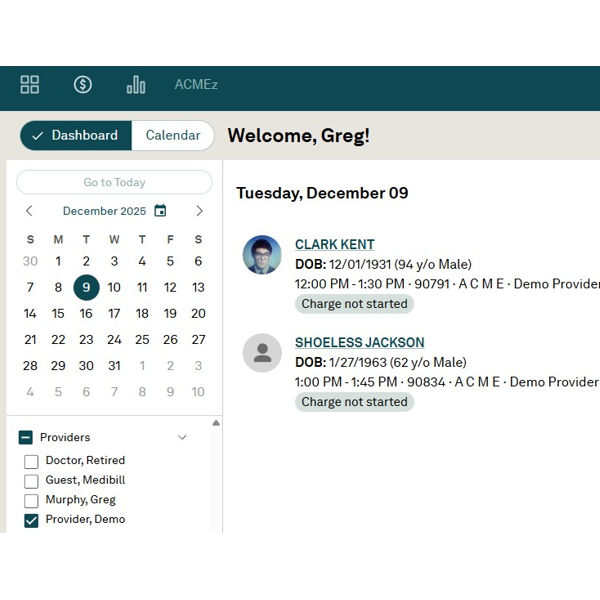
Tebra Dashboard and Calendar
Utilizing MediBill gives you full access to the Tebra platform, streamlining your entire workflow. See your whole day at a glance on the Dashboard, and the Calendar displays all providers’ schedules, with color coding and location specific (including telehealth) options available. Use the Next Available Appointment function to search for the next available appointment with any provider or with a specific provider to get your patient in as quickly as possible. From solo-providers to practices with multiple locations and hundreds of staff, Tebra’s Dashboard can handle them all.
Patient Communications
Communicating with your patients in a secure, reliable and easy manner is a base-line requirement for smooth operations, and your access to Tebra through MediBill is the answer your practice needs.
Automatic Appointment Reminders via Email, Text Message or Phone Messages are easy to set up and reduce no-shows. Activating Tebra Engage and Tebra Collect modules (*additional fees apply) opens a world of features, including online scheduling capabilities, sending and receiving secure Documents, (e.g. Intake Questionnaires, ROIs, signed Patient Authorizations and Consent forms, etc.…) as well as unlimited texting of payment links for your clients to easily pay you via credit or debit cards. And with the optional Tebra KIOSK, you can make your intake process seamless with your patients right in your waiting room!

Clinical Notes / EHR
Tebra’s EHR module, called “Clinical” (*additional fees apply), is one of the highest-rated and most-used CERTIFIED Electronic Health Record systems in the nation. Its interface is intuitive and user-friendly, yet its back-end is connected to an incredibly powerful platform with up-to-the-minute CMS and AMA definitions and edits, backup systems, and security measures.
Built-in tools include SALT capability; tag frequently-used CPTS and ICD-10 codes for easy-access; templates and commonly used notes; Start New Note right from Appointment (so you never forget to chart an encounter!); click “Charge” directly from Clinical Note to quickly capture and send your charges to Billing; keep track of “Open” (unsigned/unfinished) Notes right from your Dashboard, and much, much more!
The “Clinical Notes” functionality allows you to record notes directly in the patient’s record with preset templates like “Initial Psych Intake”, “Progress Note”, “Group Therapy”, etc. You can customize Note forms and templates to best suit your needs or note-taking style. View the patient’s Treatment Plan and session history, and lock the notes to “restricted access” so that only the patient’s provider can see their notes. Easily search by patient first/last name or DOB to bring up each patient’s facesheet. Each patient displays as active/inactive, so you can see who is currently being seen by your practice.
Documents
There is no getting around it: documents, forms, faxes and scans will never be eliminated in our digital-world, and you have to deal with them! A comprehensive, integrated and secure method of Document and Records Management is absolutely essential for a well-run practice, and it is one of the key reasons we choose Tebra. Tebra’s secure “Documents” folder has an integrated fax number, can handle virtually any file type, enables files to be “attached” directly to a patient’s record, and is powerful-enough that many of our clients use it as their complete “electronic medical records” system (when an “internal-only” system suffices.) For instance, call up any client, go to their Documents tab, and access any record with ease (case histories, prior auths, releases, etc) that have been attached to them. Files, documents, PDFs, virtually any digital file can be quickly and easily uploaded into Tebra’s powerful Documents folder!


Charge Capturing
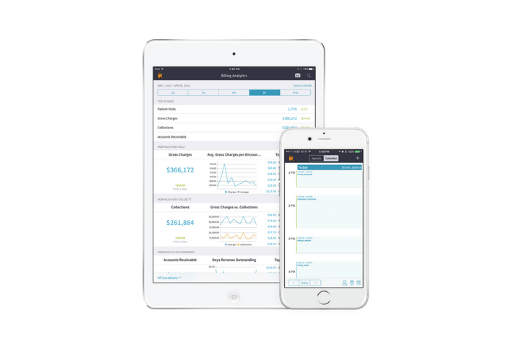
Capturing your charges and sending them to us in your Billing Department is super easy and flexible! Some of our clients like to hand write their Superbills and fax them up to their Documents folder, which is just fine. But most of our clients save time and errors by using Tebra’s “Charge” button. You can start a Charge right from the Dashboard (or from within a Clinical Note if you have Tebra’s “Clinical” E.H.R module activated,) There’s even an iPad app that works great! The Charges tab (under the Billing menu) lets you create a new charge for a patient as well and see the existing charges corresponding to each encounter with the patient. It displays the date of service, patient, provider, diagnosis and procedure codes, status of the charge, and the $ amount charged, allowing you to keep track at a glance of what’s been sent and what needs finishing. With Tebra’s Charge button, you’ll find it easy to keep up with your billing!
Billing
Compared to other systems, Tebra is easily the most cost-effective for the tools a billing company absolutely needs to deliver services in this fast-moving and complex environment. Through it, we are connected 24/7 to virtually every insurance company out there via one of our three integrated clearinghouses. The high demands of EDI communications require sophisticated platforms and Tebra has proven up to the task for us since we first went with them over ten years ago. Moreover, a surprising number of other platforms do not handle Secondary claims well (let alone Tertiary or Replacement or Voiding claims!) but Tebra recognizes the need to handle these and provides the tools to get the job done. Many other things unavailable in other systems make our job better, too, including the ability to handle multiple insurance “cases” for any given patient, or Tebra’s Patient “Alerts” capability. Tebra’s tools for tracking claims and posting payments from insurance companies are second to none. We strive to do the best job we are capable of doing for our clients and Tebra is essential for us in achieving that goal.


Patient Statements and Payments
Accurate and up-to-date Patient Statements are key to successful operations, and the ability for clients to pay as quickly and as easily as possible is the lifeblood of any practice. Reimbursements due from Copays, Coinsurance and Deductibles are ever on-the-rise and a professional approach is the only acceptable one. We can send your clients (free) Text Messages or Emails with links for them to pay you as easy as any “shopping cart” app available. “eWallet” capable. Itemization of Charges reports, Receipts, and complete Statement summaries are easily available to send to your client as requested. On your patient’s Facesheet, right next to their name, is a “Balance Due: $$ display so you can see up-to-date amounts your client may owe. Paper-based statements are also mailed on a regular basis, and we’re connected to the USPS “Common Working File,” so clients’ “forwarding addresses” are sent to us. Keeping on-top of your patient’s balances has never been more important, and with MediBill, it’s never been easier!
Hidden Features
For all of its award-winning features, we use Tebra mostly because of what you don’t see “up front.”, like: its integration to first-tier clearinghouses; its unbelievably up-time rate and relatively flawless performance; its security measures; its cost predictability and adherence to long-standing agreements, and its proven ability to improve and innovate. In this high-stakes environment, with ever-present yet unseen threats, providers, practices, and billing companies alike all need a first-rate partner, and Tebra has been our choice for over a decade.

Have more questions about our billing services? Read our FAQs!
Solving Medical Claims Billing Problems
Our team of medical billing experts take the heavy burden of insurance processing and replaces it with improved cash flow. We have a proven track record of increasing client reimbursements by working on claims until they have been paid or resolved.